
A productive home office setup can help you stay organized, comfortable, and focused while working from home. Whether you have a dedicated office or a small workspace, the right desk, ergonomic chair, lighting, and storage solutions can make your daily work more efficient. In this guide, you’ll discover practical home office essentials and budget-friendly ideas for creating a workspace that suits your needs.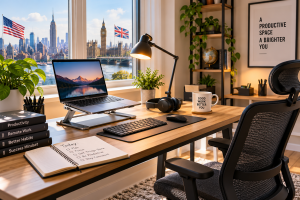
Innovative Home Office Setup Ideas:-
1. Choose the Right Location for Your Home Office:
Start by choosing a space where you can concentrate with minimal distractions. A dedicated room is ideal, but it is not essential. A quiet corner of your bedroom or living room can work just as well.
Consider these practical improvements:
- Choose a location with minimal background noise.
- Position your desk near natural light when possible.
- Keep your work essentials within easy reach.
- Separate your workspace from leisure areas as much as your home allows.
- Use a desk organiser to prevent clutter.
A consistent workspace can also help you establish a clearer boundary between work and personal time.
2. Invest in an Ergonomic Desk and Chair
Your desk and chair form the foundation of your home office. If you spend several hours a day at a computer, comfort and adjustability should be priorities.
Look for a chair with suitable back support and adjustable height. Your desk should allow your shoulders to relax, with your elbows positioned comfortably while typing.
Consider these options:
- An adjustable office chair
- A desk with enough room for your equipment
- A footrest if your feet do not rest comfortably on the floor
- A monitor riser or laptop stand
You do not need premium furniture to create a functional workspace. Start with what you have and upgrade the items that make the biggest difference to your comfort.
3. Improve Your Home Office Lighting
Good lighting can make your workspace more comfortable and reduce distracting screen reflections.
Natural daylight is a useful starting point. Position your desk near a window if possible, but avoid direct sunlight that creates glare on your monitor.
For evening work, consider an adjustable desk lamp with brightness settings suited to your environment.
Before purchasing a lamp, check its adjustability, footprint and power requirements. A compact model may be more practical for a small apartment or shared workspace.
4. Essential Home Office Accessories Worth Considering
The best accessories are those that solve a specific problem in your daily workflow.
Laptop Stand or Monitor Riser
A laptop stand can raise your screen to a more comfortable viewing height. For a more flexible setup, pair it with an external keyboard and mouse.
If you use a separate monitor, check whether its existing stand offers sufficient height adjustment before purchasing a riser.
External Keyboard and Mouse
An external keyboard and mouse allow you to position your hands independently of your laptop screen. This can make it easier to arrange your workspace around your needs.
Choose a wired or wireless model based on your preferences, desk space and device compatibility.
Noise-Cancelling Headphones
If household noise interrupts your concentration or online meetings, noise-cancelling headphones may be worth considering.
Compare comfort, microphone quality, battery life and compatibility with your computer or phone. If you regularly attend video calls, check how well the microphone handles background noise.
Desk Organiser and Cable Management
Loose cables, chargers and stationery can make a small desk feel crowded.
Simple cable clips, cable sleeves, storage trays and desk organisers can help keep frequently used items accessible without taking up too much space.
USB-C Hub or Docking Station
A compatible USB-C hub can expand the available connections on laptops with limited ports. Depending on the model, it may support USB accessories, external displays, Ethernet and power delivery.
Check your laptop’s specifications before buying. Not every USB-C port supports every display or charging feature, and capabilities vary between hubs.
5. Make Your Internet Connection More Reliable
A stable connection is important for video conferencing, cloud applications, online collaboration and transferring files.
Try these steps before spending money on new equipment:
- Run a speed test from the room where you work.
- Position your router in an open, central location when practical.
- Use Ethernet if your setup and network allow it.
- Consider a compatible mesh Wi-Fi system or extender if coverage is consistently poor.
- Keep a backup connection available for important meetings if your work requires it.
For US and UK households, the best solution will depend on the property layout, broadband service and number of connected devices.
6. Build a Home Office on a Budget
A productive workspace does not have to be expensive. Prioritise purchases based on your biggest daily frustrations rather than buying every accessory at once.
| Priority | What to consider | Why it helps |
|---|---|---|
| 1 | Comfortable chair and desk | Creates a practical foundation |
| 2 | Suitable lighting | Improves workspace visibility |
| 3 | Laptop stand or monitor riser | Gives you more flexibility in screen positioning |
| 4 | External keyboard and mouse | Allows more flexible equipment placement |
| 5 | Cable organisers | Keeps the desk tidy |
| 6 | Headphones | May help with distracting background noise |
If your budget is limited, reuse existing furniture and upgrade gradually. Spend more attention on compatibility, comfort and everyday usefulness than on appearance alone.
7. Establish a Daily Routine for Better Productivity
Your physical setup is only one part of a productive working day. A consistent routine can help you manage distractions and prioritise important tasks.
Try the following habits:
- Write down your three most important tasks before starting work.
- Schedule demanding work for the time when you tend to concentrate best.
- Take regular short breaks.
- Silence unnecessary notifications during focused work.
- Keep a simple list of unfinished tasks for the next day.
- Establish a clear finishing time whenever your schedule allows.
You can also experiment with the Pomodoro technique, which alternates focused work sessions with short breaks. Adjust the intervals to suit your workload and attention span.
8. What to Check Before Buying Home Office Accessories
Online shoppers in the United States and United Kingdom should compare more than the headline price.
Check the following before placing an order:
- Dimensions: Will the product fit your desk and available workspace?
- Compatibility: Does it support your laptop, monitor and operating system?
- Customer feedback: Look for recurring comments about reliability, comfort and usability.
- Warranty: Understand the coverage and claim process.
- Returns: Check the seller’s return window and any restrictions.
- Delivery and taxes: Review shipping costs and applicable taxes before checkout.
- Electrical compatibility: For powered products, verify the appropriate plug, voltage and charging requirements.
Prices, product availability and delivery policies can vary by country. Check the details for your location before purchasing.
Frequently Asked Questions
What is the most important item in a home office?
A comfortable chair and a suitable desk are strong starting points. After that, prioritise lighting and accessories that address the specific challenges of your work.
How much does it cost to set up a home office?
The cost depends on the equipment you already own, your available space and your requirements. You can begin with an existing desk and computer, then add accessories gradually.
Which home office accessories are worth buying?
A laptop stand, external keyboard, mouse, desk lamp, headphones and cable organisers can all be useful. The best choices depend on your workflow, comfort preferences and budget.
Do I need a separate room to work from home?
No. A quiet, organised corner can be sufficient. Focus on suitable lighting, comfortable seating, reliable connectivity and a workspace that meets your needs.
Is a standing desk necessary for a productive home office?
No. A standing desk is an optional choice, not a requirement. Changing positions and taking regular movement breaks may be more practical than relying on a particular desk type.
Final Thoughts
Building a productive home office in 2026 is about creating a space that supports your work, fits your home and stays within your budget.
Start with the essentials, improve your lighting and seating, and add accessories only when they solve a genuine problem. Before buying, compare specifications, compatibility, customer feedback and return policies.
Ready to improve your workspace? Make a list of the three biggest problems with your current setup and prioritise the upgrades that address them.
Disclosure: This article may contain affiliate links. If you purchase through qualifying links, the website may earn a commission at no additional cost to you. Product availability, pricing and terms may change, so please check the seller’s current information before purchasing.
Stress Management techniques 2025